Interview Cake
Quick reference
| Complexity | |
|---|---|
| Worst case time | O(n) |
| Best case time | O(n) |
| Average case time | O(n) |
| Space | O(n) |
Radix sort is a non-comparison sorting algorithm that sorts integers one digit at a time, from the least significant digit to the most significant, using a stable sort (usually counting sort) on each digit. In general it takes O(ℓ·(n + k)) time for n numbers with \ell digits that can each take on k values. For fixed-width integers (like 64-bit ints), \ell and k are constants, which is where the O(n) in the table above comes from.
Strengths:
- Linear Time. Radix sort takes time to sort n integers with a fixed number of bits.
- Punch card Friendly. Way back in the day (like the 50's and 60's), programs were written on these cards with holes in them, called punch cards. Radix sort works really well for sorting these physical cards. (It was a big deal at the time.)
Weaknesses:
- Restricted inputs. Radix sort only works when sorting numbers with a fixed number of digits. It won't work for arbitrarily-large numbers.
How It Works
Radix sort works by sorting the input numbers one digit at a time.
As an example, let's sort this array:
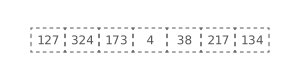
First, we'll sort on the one's place:
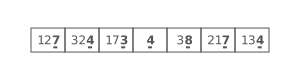
Any stable sorting algorithm can be used here. In practice, counting sort works well, since the digits can only take on a small number of values (i.e.: 0 - 9 for base-10 numbers; 0 - 1 for base-2 numbers).
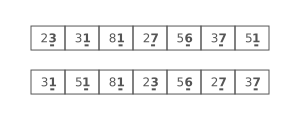
Here's what sorting on the one's place gets us:
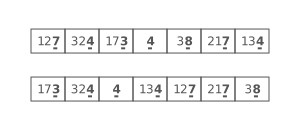
Then, we'll sort on the ten's place:
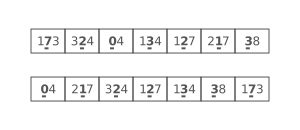
Notice how whenever there was a tie in the tens place the number with a lower ones digit came first. This is why using a stable sorting algorithm is important. It means that if there's a tie on the current digit we'll fall back to how the numbers were ordered based on the digits we already sorted.
And finally, we'll sort on the hundred's place:
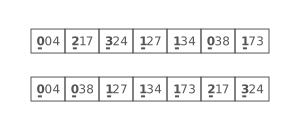
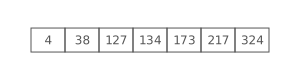
Once we've sorted all the digits, we're done! :)
Implementation
Here's how we'd code it up. We'll assume that all the inputs are 64-bit integers.
Since the numbers are stored in binary, we'll run our radix sort on their binary digits (instead of the digits in their base-10 representations).
We'll be using bit shifting and bitwise ands to extract individual bits from items in the input array.
Complexity
Radix sort takes O(ℓ·(n + k)) time and O(n + k) space, where n is the number of items to sort, \ell is the number of digits in each item, and k is the number of values each digit can have.
You'll also see this written as O(d·(n + b)), for d digits in base b. Same idea, different letters.
This time complexity comes from the fact that we're calling counting sort one time for each of the \ell digits in the input numbers, and counting sort has a time complexity of .
The space complexity also comes from counting sort, which requires space to hold the counts, indices, and output arrays.
In many implementations, including ours, we assume that the input consists of 64-bit integers. This means that the number of digits, \ell is a constant (64). With a binary number, each digit can either be a zero or a one, meaning that k is also a constant (2). With these assumptions, radix sort becomes O(n) time and O(n) space.
Radix Sort vs. Counting Sort
Radix sort is built on top of counting sort, so it's worth knowing when to reach for each one:
| Radix sort | Counting sort | Comparison sorts (merge sort, quicksort, ...) | |
|---|---|---|---|
| Time | O(ℓ·(n + k)), where k is the number of values per digit | O(n + k), where k is the range of the input values | O(n log n) at best |
| Space | O(n + k) | O(n + k) | Depends on the algorithm |
| Stable? | Yes (as long as each pass is stable) | Yes (the standard version) | Some are (merge sort), some aren't (quicksort) |
| Best for | Lots of integers (or fixed-length keys) with a wide range of values | Integers that fall in a small range | Anything you can compare |
Counting sort is great when the range of values is small, but sorting numbers that go up to a billion would need a billion counters. Radix sort gets around that by running counting sort once per digit, so each pass only needs as many counters as there are possible digit values.
Sorting interview questions to practice
Each one walks you through a real coding interview problem one hint at a time.
- Merging Meeting Times » Merge overlapping meeting time ranges into condensed blocks: the classic merge intervals problem, with a step-by-step O(n lg n) solution.
- Merge Sorted Arrays » Write a function for consolidating cookie orders and taking over the world.
Your first 3 questions are free. Just sign in, no credit card.
Interview coming up?
Get the free 7-day email crash course. You'll learn how to think algorithmically, so you can break down tricky coding interview questions.
No prior computer science training necessary—we'll get you up to speed quickly, skipping all the overly academic stuff.
No spam. One-click unsubscribe whenever.
You're in! Head over to your email inbox right now to read day one!